


Gridwise: Gig Driver Assistant
4.53.06K Reviews
App Specs
- Version
- 3.80.2
- Updated On
- License
- Free
- Downloads
- 1,000,000+
- Developer
- Gridwise
- Categories
- Finance
- Platform
- Android
Screenshots
 Analysis by AppCompare
Have you ever found yourself juggling multiple gig driving apps, trying to keep track of your earnings, mileage, and expenses? Well, let me introduce you to Gridwise: Gig Driver Assistant, the app that promises to be the ultimate game-changer for gig drivers. Whether you’re driving for Uber, Lyft, DoorDash, or any other service, Gridwise aims to simplify your life. I’ve taken it for a spin, and here’s what I discovered.
I find this kind of finance app most useful when driving is spread across different platforms and the end of a shift leaves me with scattered information. Gridwise is built for that specific problem: it is a free app from Gridwise, with a 4.5 average from around 12 thousand ratings and more than a million installs. It is rated for Everyone, and its current version is 3.76.1. In-app purchases range from $0.99 to $109.99 per item, so I would check what an optional purchase covers before treating the free download as the whole cost picture.
Before the shift: decide what you want to learn
For me, the best starting point is not simply opening the app and hoping it will increase my income. I would first decide what question I need it to answer: which platform is contributing most to my work, whether my driving time is paying off, or how much mileage I need to remember for later. That small habit makes the records more useful because a dashboard only helps when I know what decision I am trying to make.
This is especially relevant if I switch between passenger rides and deliveries. I might finish a morning doing one type of work and spend the evening on another, then forget which block felt worthwhile. Having information organized by day, week, and month gives me a way to review those patterns rather than relying on a vague memory of a busy shift. I would use that history to plan when to work, not as a promise that the next shift will produce the same result.
First Impressions
At first glance, Gridwise has a clean and intuitive interface. It’s not cluttered with unnecessary features, which is refreshing. After downloading and setting it up, I was pleasantly surprised by how easy it was to link my gig accounts. The app supports a wide range of platforms, making it super versatile for drivers who wear many hats.
Tracking Earnings and Mileage
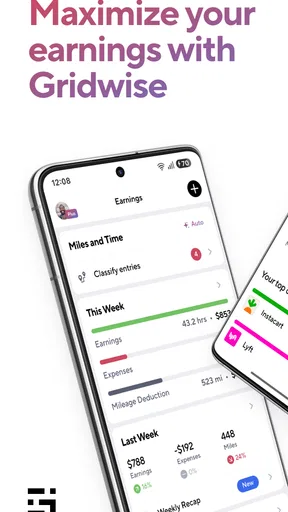
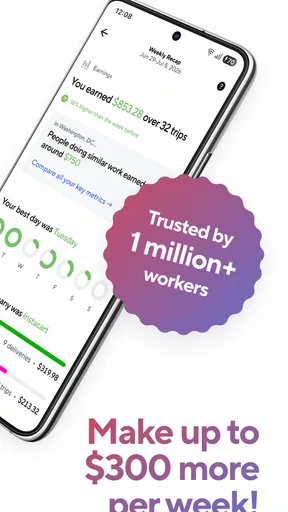
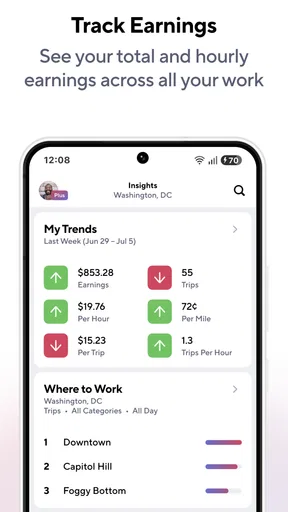
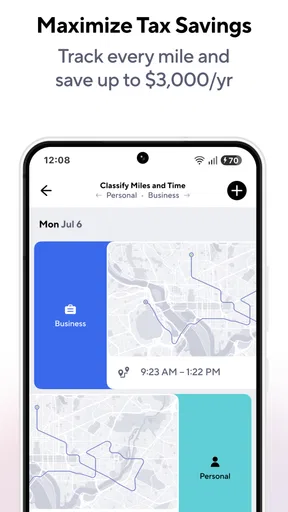
One of the standout features of Gridwise is its ability to track your earnings and mileage automatically. Gone are the days of scribbling down numbers on crumpled receipts or using multiple apps to piece together your income. Gridwise syncs with your gig accounts and provides a comprehensive overview of your earnings and mileage. It even breaks down the data by day, week, and month, helping you see where your efforts are paying off the most.
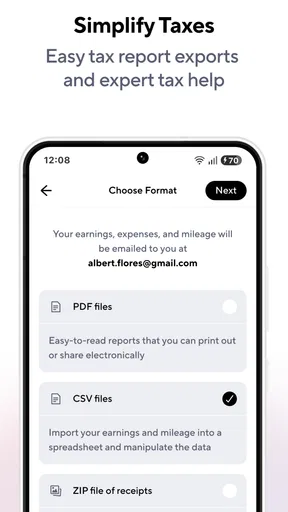
The mileage tracking is accurate, and I found the reports to be quite detailed. You can easily export them for tax purposes, which is a lifesaver come tax season. Trust me, your accountant will thank you!
Worth Reading Before You Choose

EA SPORTS FC Mobile 26 Is a Bigger Football Game, but It Takes Time

Flipboard Shows What News Apps Must Do Beyond the Feed

Switching to Android Auto Means Rethinking Your Driving Routine

Google Calendar Makes a Crowded Week Easier to Manage

Ludo King Makes the Most of the Minutes Between Plans

Baby Panda World Brings Quick Play to Modern Phones, but Its Game Library Feels Busy
Making the records work harder
A practical workflow is to review the day’s figures while the shift is still fresh. If one platform’s earnings look unexpectedly low, I can compare that day with my own notes about the hours and type of work rather than jumping to conclusions. This is a useful distinction: an earnings summary can show what happened, but it does not by itself explain why demand, waiting time, or route choices affected the outcome.
I would also treat mileage records as bookkeeping support, not as a reason to stop keeping other financial documents. Mileage is only one part of understanding the cost of driving; fuel, maintenance, and other work expenses still need sensible personal records. The export option makes it easier to pass organized mileage information along, but I would check the report before relying on it for a filing or handing it to an accountant. A quick review can catch a missed day or a tracking gap while it is still easy to investigate.
Insights and Alerts
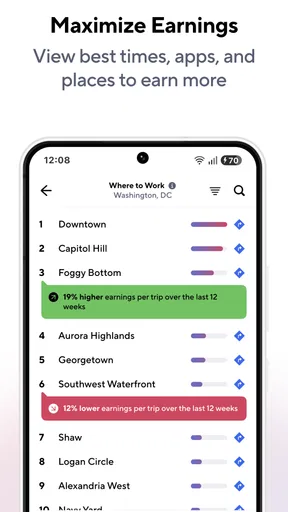
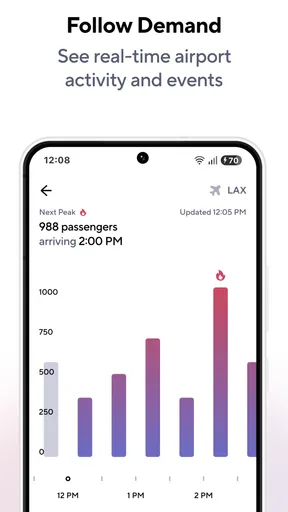
What sets Gridwise apart from other apps is its insights and alerts feature. The app provides real-time updates on airport traffic, weather conditions, and local events that could impact demand in your area. This is invaluable for maximizing your earnings, as you can strategically position yourself to catch more rides or deliveries.
The alerts are customizable, so you won’t be bombarded with notifications you don’t care about. I found the weather updates particularly useful, especially during unexpected downpours that tend to increase ride requests.
Using alerts without chasing every signal
I would use those updates as context, not as instructions to drive somewhere immediately. A large event or a weather change may affect demand, but the alert alone cannot tell me whether the trip to a busier area is worth the extra distance or time. My approach would be to compare the information with where I already am, how long I plan to work, and whether I am driving passengers or handling deliveries.
That restraint matters because a notification can make a possible opportunity feel more certain than it is. If I am already near a useful area, an event update may help me decide to stay available. If reaching it means an inconvenient detour, I would weigh that against the actual work I can see on my driving platforms. This is where Gridwise can complement my judgment, but it cannot replace it.
Handoffs between platforms and real-world decisions
Gridwise sits alongside the services that provide the actual rides or delivery offers, rather than replacing them. I would still use each work platform to accept jobs and handle the parts of the shift it controls, then use Gridwise to bring earnings and mileage into a broader view. That handoff is valuable for someone who rotates among services, but it also means there are several apps in the workflow rather than one universal control panel.
For example, imagine I work a lunch delivery block, take a break, and later switch to rides. At the end of the day, I can look at the combined record and compare it with my recollection of the two blocks. If the afternoon felt busy but the weekly view does not show a useful return, that is a prompt to investigate the pattern—not proof that one platform is always better. Over time, comparing similar shifts is more informative than reacting to one unusually good or bad day.
This is also why I would avoid making an immediate change to my schedule based on a single alert or report. A better routine is to review several work periods, note the conditions that differed, and then test one adjustment at a time. That gives the information a fair chance to help without mistaking coincidence for a reliable trend.
Community and Support
Gridwise also fosters a sense of community among gig drivers. The app includes a social feature where drivers can share tips, stories, and advice. It’s like having a support group at your fingertips. I found this aspect of the app both engaging and informative. Sometimes, all it takes is a piece of advice from a fellow driver to make your day a whole lot easier.
If you ever run into issues, the support team is responsive and helpful. They’re pretty quick to address any concerns, which is always a plus in my book.
The community can be most useful when I treat it as a source of practical perspectives rather than a rulebook. A driver’s tip may reflect a particular city, time, or work style, so I would compare it with my own experience before changing a routine. That makes the social side a helpful complement to tracking: reports show my own patterns, while other drivers may suggest a question I had not thought to ask.
Who benefits, and who may prefer another approach
I think this app is a strong fit for drivers who use more than one gig service and want a clearer record of earnings and mileage without building a spreadsheet from scratch. It can also suit someone who is new to app-based driving and wants to develop a regular review habit early. The finance angle is practical: it helps make work activity easier to inspect, rather than turning the phone into another place to accept jobs.
On the other hand, someone who drives only occasionally for one service and already has a comfortable way to track work may not gain enough from adding another app. A notebook or spreadsheet can be better for a driver who wants complete manual control, while the platform’s own earnings screen may be sufficient for a person who only needs a quick view of one service. Gridwise’s advantage is aggregation and context; its trade-off is that it adds setup and another place to check.
It is free to download, but the presence of in-app purchases means I would distinguish between trying the basic workflow and deciding whether any paid option is worthwhile. I would start by seeing whether the account connection, mileage records, and summaries fit my routine before spending money. The app is available for devices running Android 8.0 or later, which is useful to check before planning to make it part of a shift.
Room for Improvement
No app is perfect, and Gridwise is no exception. While it offers a plethora of helpful features, there were times when the app lagged a bit, especially during peak hours when more drivers might be logging in simultaneously. However, this was a minor hiccup and didn’t detract significantly from the overall experience.
Additionally, while the app covers many gig platforms, there are still a few niche services not yet supported. It would be great to see Gridwise expand its compatibility in the future to accommodate all drivers.
Those limitations matter most when a driver depends on a less common service or needs a smooth check-in at a busy moment. Before relying on account syncing for every part of my recordkeeping, I would confirm that the platforms I actually use are supported and that the information is appearing as expected. If a service is not covered, keeping a separate note for that work is a more dependable fallback than assuming the combined view includes everything.
Lag can also change how I use the app during a shift. I would not make checking a dashboard part of every stop or interrupt a safe driving routine to inspect an alert. The better time for detailed review is when parked and finished working; during the shift, a glance at relevant information should never compete with attention on the road. This is a small but important trade-off for any tool designed to accompany driving work.
Finally, I would keep expectations grounded. A record of earnings and mileage can help me understand my work and organize tax preparation, while local updates can add useful context. Neither guarantees a higher take-home amount, and an alert cannot ensure that a particular area will produce a worthwhile job. The app is most convincing as an organizer and decision aid, not as a substitute for careful choices about time, distance, and expenses.
Final Thoughts
All in all, Gridwise: Gig Driver Assistant is a must-have for gig drivers looking to streamline their operations and maximize their earnings. The app’s comprehensive tracking, insightful alerts, and supportive community make it an invaluable tool in the gig economy. So, if you’re tired of juggling multiple apps and want a one-stop solution, give Gridwise a try. It might just be the assistant you didn’t know you needed.
My recommendation is strongest for a multi-platform driver who will actually review the records and use them to make measured decisions. If I only want to see one service’s latest total, its own app may be simpler; if I want a more joined-up picture of driving work, Gridwise has a clearer role. I would begin with one complete shift, check whether the connected earnings and mileage make sense, and then decide whether the summaries are useful enough to keep in my routine.
Gridwise was released on December 3, 2016, and the continued version updates show that it remains an actively maintained option in this space. My overall view is positive, with one condition: I would use it as a practical assistant, not an automatic earning strategy. Its value comes from helping me see the work I have already done more clearly, then making better-informed choices about what to do next.
Pros
- User-friendly interface simplifies navigation.
- Tracks earnings across multiple platforms.
- Real-time weather and traffic updates.
- Mileage tracking for easy tax deductions.
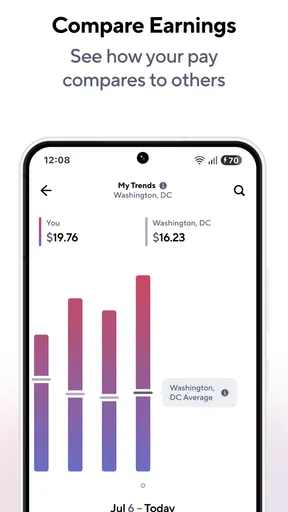
- Income comparison with other drivers.
Cons
- Limited features in free version.
- Battery consumption can be high.
- Requires constant internet connection.
- May not support all gig platforms.
- Occasional syncing issues reported.
FAQs for Gridwise: Gig Driver Assistant
What is Gridwise and how does it assist gig drivers?
Gridwise is a mobile app designed to support gig drivers by providing tools to optimize their earnings and manage their time efficiently. The app offers features like mileage tracking, expense logging, and insights into the best times and places to drive. It integrates with popular rideshare and delivery platforms to streamline operations.
Is Gridwise compatible with all gig driving platforms?
Gridwise is compatible with major gig driving services, including Uber, Lyft, DoorDash, and Postmates, among others. It allows drivers to sync their accounts for a comprehensive view of their driving activity. Before downloading, check for the latest compatibility updates to ensure it supports the platform you work with.
How does Gridwise help with earnings and mileage tracking?
Gridwise automatically tracks your mileage and calculates potential tax deductions, helping you maximize your earnings. It also provides detailed earnings reports and performance metrics, so you can identify trends and areas for improvement. This feature simplifies tax season and helps manage your finances better.
Is Gridwise free to use, or does it require a subscription?
Gridwise offers a free version with essential features, but also provides a premium subscription called Gridwise Plus. The premium version includes advanced features like airport demand graphs and premium support. Users can choose the plan that best fits their needs and upgrade if they require additional functionalities.
How does Gridwise ensure the privacy and security of my data?
Gridwise prioritizes user privacy and security by employing robust encryption and data protection practices. It only accesses data necessary to provide its services and never shares personal information without consent. Users can review the app's privacy policy for detailed information on data handling practices.


